
The RAG demo answered every question correctly.
Production failed on nearly half of real queries.
Enterprise documents are not just text. They contain tables, scanned pages, charts, handwritten notes, and complex layouts that traditional retrieval pipelines struggle to process. This guide explains why text-only retrieval fails, compares three multimodal RAG approaches, and helps you choose the right architecture for production.
That gap has nothing to do with the model. It is the documents. The demo ran on clean text PDFs. Your production system runs on what enterprise knowledge bases actually look like: engineering specs with embedded tables, financial reports with multi-column layouts, compliance files with handwritten annotations, and scanned contracts where the text is an image.
Multimodal RAG picks up where text extraction leaves off, extending the pipeline to handle visual structure the way real documents carry it. Knowing where text-only breaks, and which approach fits your situation, is what separates retrieval that survives production from retrieval that only survived the demo.
Why Text-Only RAG Fails on Enterprise Documents
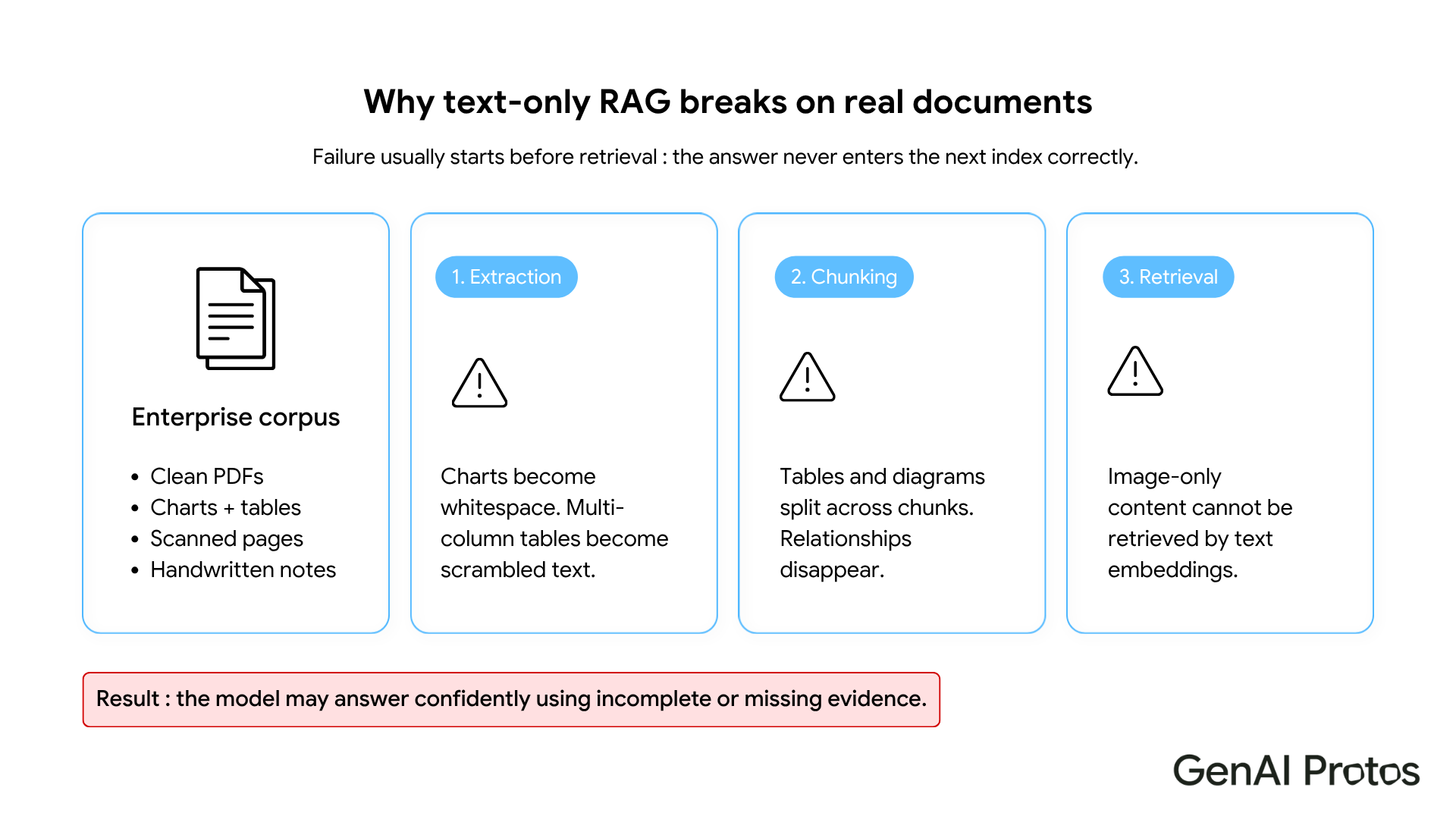
Document retrieval begins at extraction. That is also where most text-only retrieval augmented generation pipelines quietly break.
Standard PDF parsers read text in the order the file's internal structure defines, an order built for visual rendering, not clean sequential extraction. Multi-column financial tables come out as garbled number sequences. Charts become blank space. Embedded figures simply vanish. A retrieval augmented generation system built on this output will answer questions about table data confidently and incorrectly, because the correct answer was never in the text layer.
Chunking is the second failure point. Strategies based on sentence boundaries, token counts, or paragraph breaks have no awareness of visual units. A chart is not a paragraph and a table is not a sentence. When a table splits across two chunks, the relational structure disappears. A query about two columns will not retrieve a chunk with the answer, because no single chunk holds the full table. The RAG pipeline returns the wrong context, and the model fills in the rest.
Third: image-encoded content. Scanned pages are images. Handwritten notes are images. Diagrams are images. Dense text embeddings cannot retrieve what was never converted to text. The system returns something out of context, or hallucinates entirely.
Real enterprise documents require more than text extraction before retrieval can function reliably. That is the core problem this guide addresses.
Which Multimodal RAG Architecture Is Right for You?
OCR Plus Structured Extraction
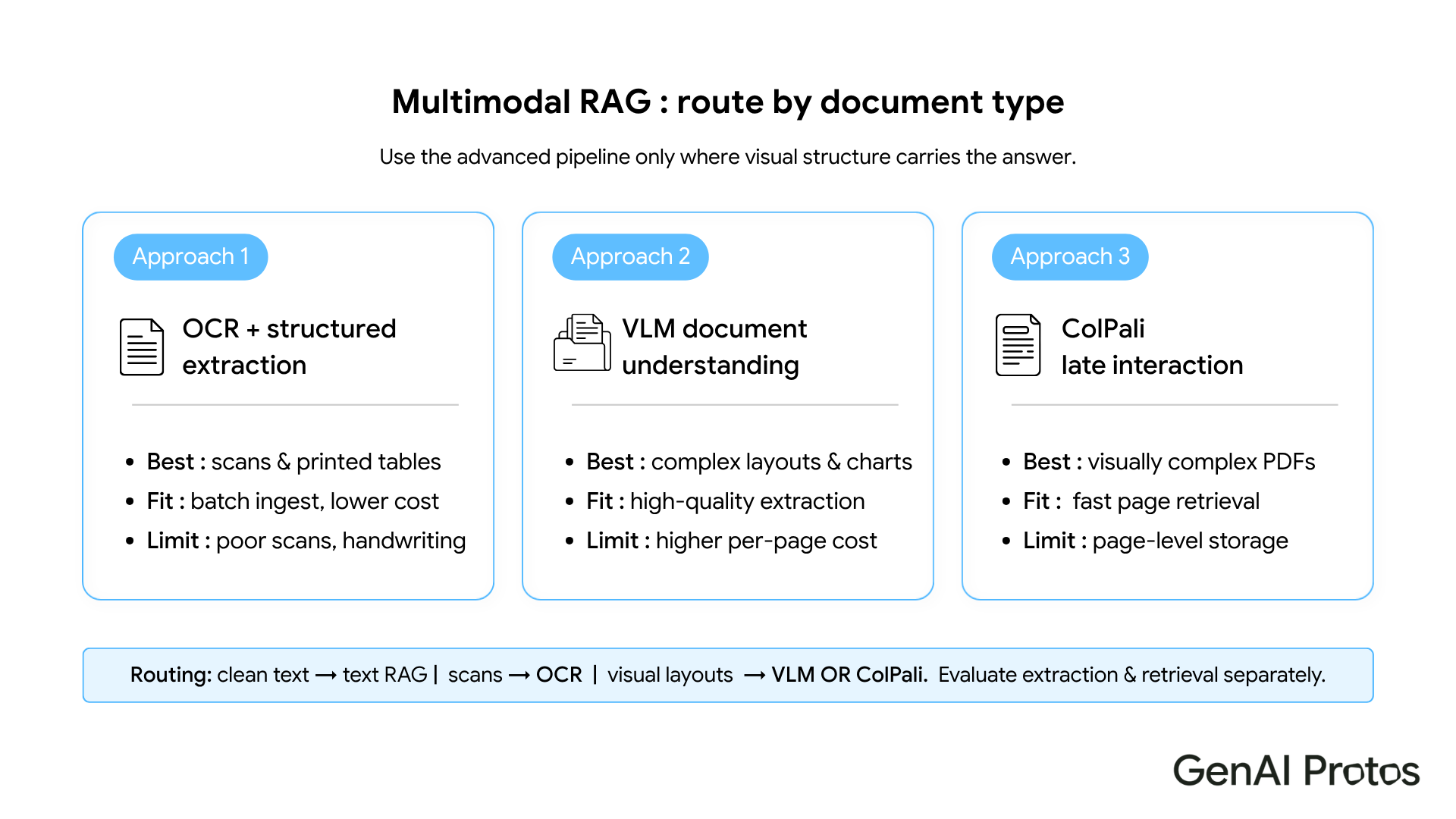
This is the practical starting point for most teams. An OCR engine runs over document pages, extracting text from images and scanned content, and a structured extraction layer pulls out tables, charts, and figures as usable data.
It handles high-volume scenarios well: overnight batch ingestion, large stable document libraries, processing pipelines where user-facing latency is not a factor. It is the lowest-cost entry point and covers a wide range of enterprise document types without overcomplicating the architecture.
Where it struggles: low-quality scans, complex multi-page tables, and documents where meaning lives in the visual layout rather than in the extracted text. If a significant portion of your corpus falls into these categories, OCR extraction alone will leave accuracy gaps that no amount of prompt tuning will fix.
Vision Language Models for Document Understanding
Instead of extracting text first, this approach sends document pages as images directly to a vision language model. The model describes charts, transcribes tables, and extracts structured content as part of the ingestion step.
For regulated industry reports, legal contracts, and financial statements with dense multi-column layouts, the accuracy lift over OCR is meaningful.
The trade-off is latency. VLM extraction takes several seconds per page. For asynchronous ingestion pipelines that run overnight, that is acceptable. For real-time applications where users expect immediate responses, it is not. Design your architecture around that constraint before choosing this path, not after.
ColPali: Late Interaction Retrieval on Document Images
ColPali takes a different approach entirely. Instead of extracting text from pages, it embeds entire document pages as images and matches queries against those image embeddings using a late-interaction scoring mechanism that works across visual patches of the page.
The result: it retrieves the correct page on visually complex documents, including charts, tables, and mixed layouts, with sub-200ms latency on a standard GPU instance. No OCR step, no VLM extraction at query time. The RAG pipeline calls retrieval, gets the right page, then passes it to a language model for the final answer.
This suits real-time, user-facing applications where extraction latency is the constraint OCR and VLM cannot work around. The current practical limit: ColPali embeds at the page level, so storage scales directly with document length. For very large corpora, that is a cost to plan for.
Quick Comparison: OCR vs VLM vs ColPali
| Approach | Best For | Speed | Accuracy | Cost |
|---|---|---|---|---|
| OCR | High-volume batch, clean scanned documents | High | Medium | Low |
| VLM | Complex layouts, legal, financial documents | Medium | High | High |
| ColPali | Real-time user-facing retrieval, mixed layouts | Very High | High | Medium |
3 RAG Pipeline Mistakes That Hurt Production Accuracy
Benchmarking on clean documents. Standard evaluation sets use clean, well-structured text. Enterprise corpora do not. Before committing to an architecture, build an evaluation set from your actual documents, weighted toward the queries your users will actually ask. Run all three approaches against it. The numbers will not match what vendor demos show, and that is the point.
Applying one approach to the entire corpus. Most enterprise document libraries mix document types: some clean PDFs, some scanned reports, some complex layouts. A routing layer, using text chunking for clean PDFs, OCR for moderate-quality scans, and VLM or ColPali for complex layouts, reduces ingestion cost significantly without sacrificing accuracy. Classify at ingestion time. Route accordingly. This is standard practice at production scale, not a premature optimization.
Treating extraction accuracy as retrieval accuracy. They are separate metrics. A pipeline can extract every table correctly and still fail to retrieve the right table for a given query because the chunk lacks enough semantic context. Evaluate both layers independently, with separate test sets, before declaring the system production-ready.
How to Build a Production-Ready Document AI Strategy
Start with a corpus audit. What share of your documents contain charts, tables, scanned pages, or non-text content? That single number tells you whether text-only retrieval covers your needs or whether a more capable pipeline is the right call.
If the audit shows a significant non-text portion, start with OCR plus structured extraction. It is the cheapest, the easiest to debug, and sufficient for a meaningful share of enterprise document types. Layer in VLM or ColPali only where OCR accuracy on your evaluation set falls short.
Build your evaluation set before you choose your architecture, not after. Include questions that can only be answered from tables, charts, or image-encoded sections. Evaluate at the extraction layer and the retrieval layer separately. Most teams skip this step. Most teams also find out why they should not have, a few weeks after launch.
Text-only retrieval is not the wrong answer. It is an incomplete answer for the documents most enterprise knowledge bases actually contain. The right document AI approach depends on your corpus, your query patterns, and your latency budget, not on what performed well on a clean-text demo. The teams that close the production accuracy gap fastest are the ones who measured first.


