You shipped the demo. The agent answered every question. Two weeks later, the same agent has no idea what the user asked last session. It re-introduces itself. It re-reads the same documents. It repeats a mistake it already corrected. That is not a model problem. That is a memory problem. And it is the single most common reason enterprise ai agents never leave the pilot.
Teams that want to know how to build ai agents that survive production need to solve memory before they optimize anything else. This post covers the four types of llm memory, the agentic memory patterns that consistently ship, and the architectural decisions that separate agents that scale from agents that stall.
What ai agent memory actually means in production
AI agent memory is the ability to store and retrieve information across time boundaries: across tool calls, across sessions, across agents in a multi-agent pipeline. Without it, every invocation is a blank slate.
LLMs persist nothing natively. The context window is the only thing an LLM "knows" at inference time. When the session ends, that context is gone. Memory is always an external system, always developer-owned, and always a design decision, not a framework default.
Most teams discover this too late. They build the reasoning loop first, then realize the agent cannot connect Monday's analysis to Thursday's follow-up. Retro-fitting memory into a live agent is significantly harder than designing for it upfront. The cost of skipping this step: agents that feel broken to users and pilots that fail to convert.
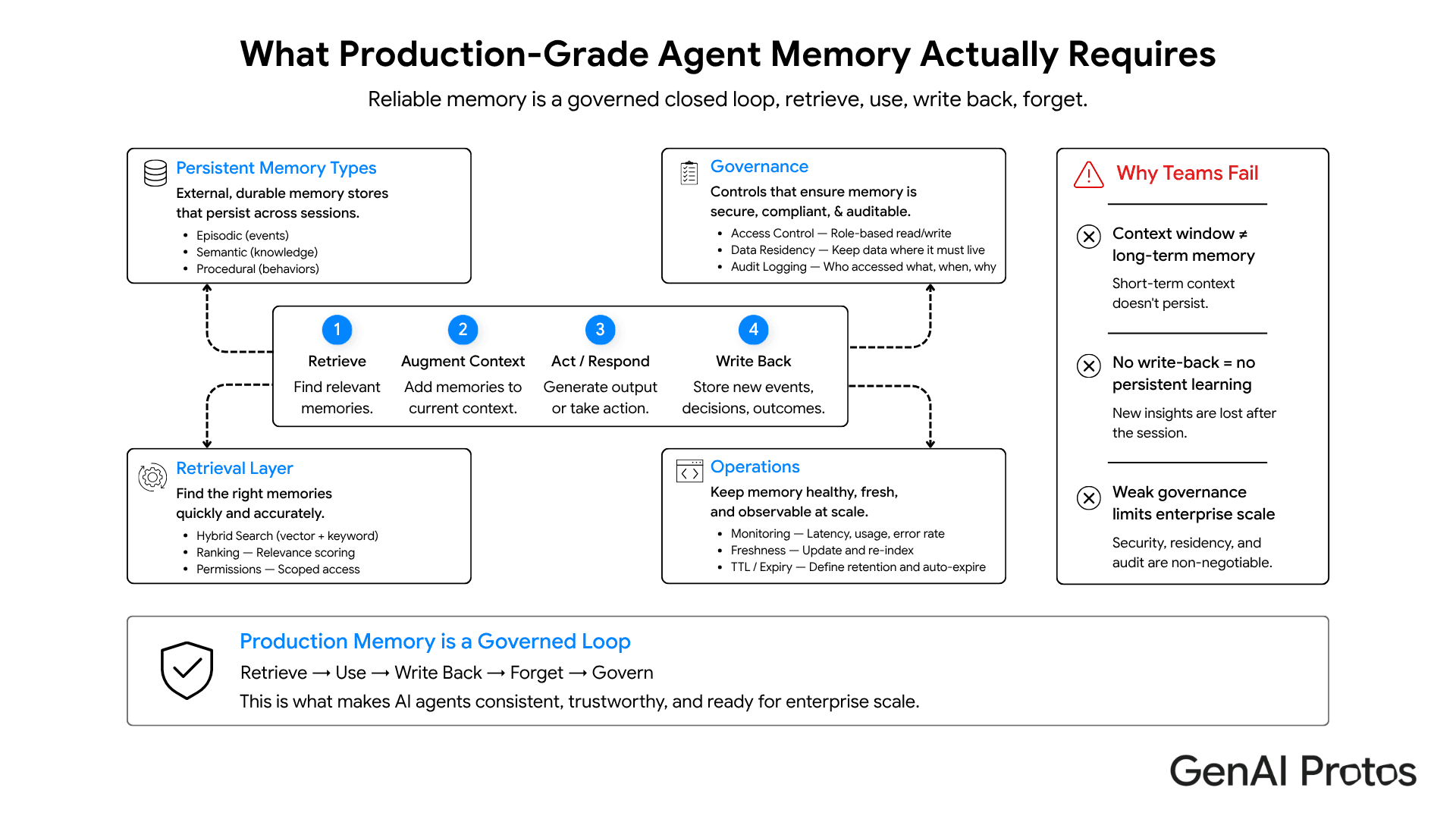
The four types of llm memory and when each earns its keep
The CoALA framework (Princeton, 2024) is the clearest taxonomy available. It maps llm memory to four types, each with a different storage backend and a different production trade-off.
| Memory Type | Storage | Scope | Best For | Trade-off |
|---|---|---|---|---|
| Short-term (in-context) | LLM context window | Current session only | Chat continuity, task steps | Lost on session end; token cost rises with length |
| Episodic (event log) | Vector store / DB | Across sessions | User history, past decisions | Retrieval adds 50-150ms; index maintenance needed |
| Semantic (knowledge) | Vector store / graph | Persistent, broad | Domain facts, SOPs, product data | Staleness risk; needs refresh pipeline |
| Procedural (learned behaviors) | Fine-tune / prompt cache | Persistent | High-frequency task patterns | Fine-tune cost; behavior drift over time |
Short-term memory is the context window. Zero latency, free to implement, and gone on session end. Token cost scales linearly with conversation length. Most teams start here and get stuck here.
Episodic memory is what moves the needle in production. Storing structured event logs in a vector database, then retrieving the top-k relevant events at query time, adds roughly 50-150ms but gives the agent a working long-term record. A support agent that remembers a user escalated twice, a coding agent that remembers a test suite is fragile: that is episodic memory earning its keep.
Semantic memory handles domain knowledge: product specs, SOPs, compliance rules. Retrieval-augmented generation (RAG) is the standard implementation. The trade-off is staleness, the knowledge base needs a refresh pipeline or answers drift from reality. Procedural memory, learned task sequences stored via fine-tuning or prompt caching, earns its keep only when the agent runs the same high-frequency workflow at scale.
How enterprise ai agents use memory differently
Enterprise ai agents operate under constraints that make memory design more complex than consumer use cases. Three requirements come up on every enterprise engagement.
Multi-agent memory sharing
In a pipeline with a planner, a researcher, and an execution agent, each agent needs access to shared episodic context, not just its own session history. This requires a centralized memory store with role-scoped read/write access. Agents with isolated memory produce inconsistent outputs at pipeline boundaries and duplicate retrieval work.
Data residency and compliance
In regulated industries, finance, healthcare, legal, memory contents cannot route through external APIs. The vector store and the embedding pipeline both need to run on infrastructure the enterprise controls. This is one reason teams building enterprise ai agents are moving toward self-hosted LLM deployments rather than managed cloud APIs. GP Studio supports on-premise vector stores as part of its AI agent infrastructure.
Auditability
When an agent makes a decision based on a retrieved memory, that retrieval needs to be logged: which records were retrieved, at what similarity score, and what action followed. Without this, debugging production failures becomes guesswork.
See how this works in practice: GenAI Protos JIRA AI Agent prototype
Agentic memory patterns that ship vs patterns that stall in demos
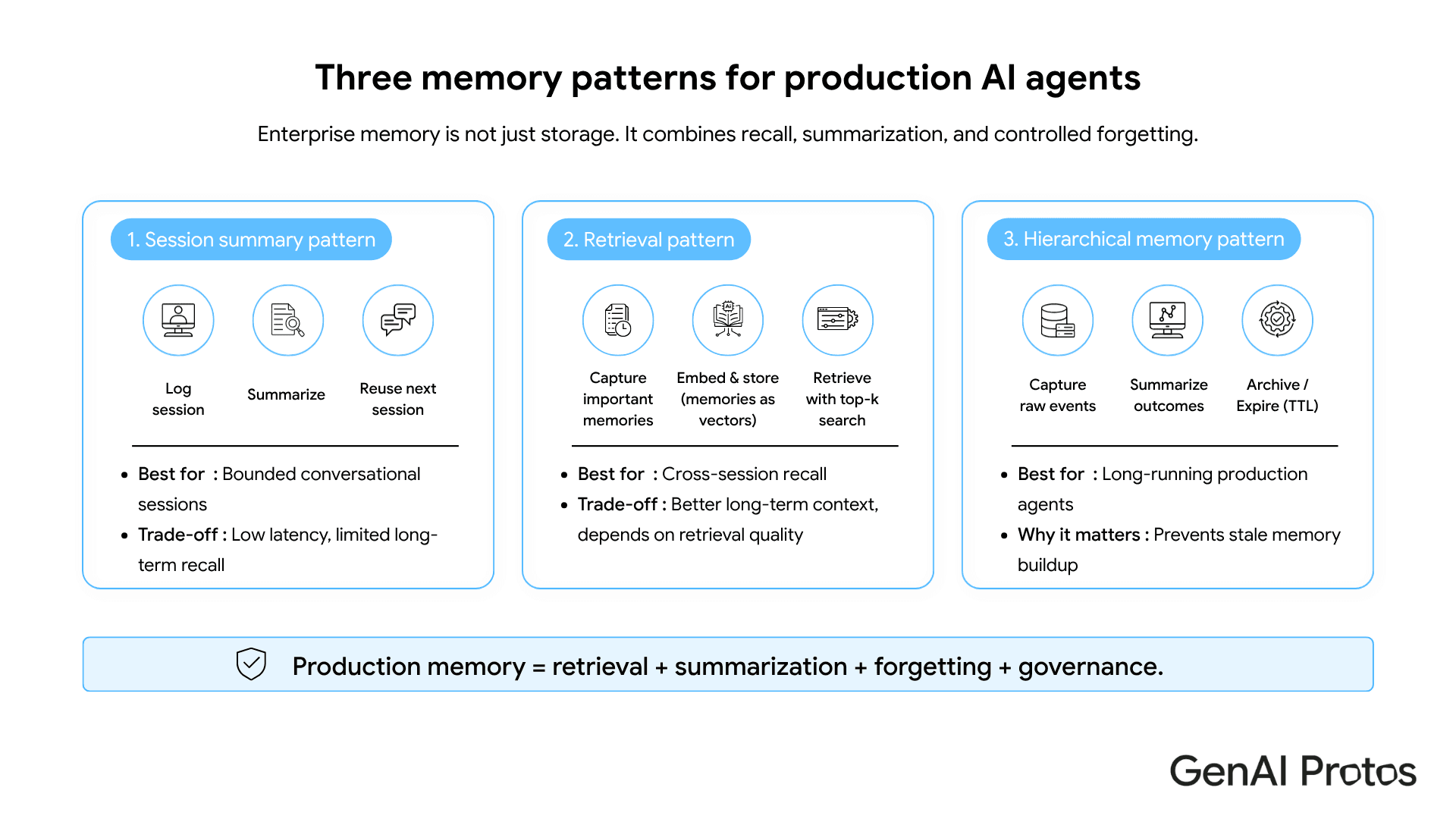
Agentic memory is not one thing. It is a set of design patterns, each appropriate for a different agent architecture. Three patterns consistently make it to production.
Pattern 1: Session log with rolling summarization
Store the raw event log per session. At session end, run a summarization pass and store the compressed summary as the long-term record. Inject the summary into context at session start. Token cost: low. Retrieval latency: near-zero. This pattern works for most conversational agents where sessions are discrete and bounded.
Pattern 2: Vector store with top-k retrieval
Embed every significant event, decision, and user preference. At query time, embed the current context and retrieve the top-k most semantically similar records. p95 retrieval latency: 50-150ms against a well-indexed store of up to 1 million records.
The GenAI Protos FactPulse system uses this: each claim checked is embedded and stored, so the agent does not re-verify the same source twice. See: FactPulse Fact Check prototype
Pattern 3: Hierarchical memory with explicit TTLs
Not all memory should persist. Define time-to-live values on episodic records. When a task is completed and verified, archive the raw log and keep only the outcome summary. Teams that skip the forget step watch their retrieval precision degrade over 60-90 days as the store fills with stale context that actively misleads the agent. Forgetting is not optional. It is part of the design.
What teams get wrong when they build ai agents with memory
Common pitfall: Treating the context window as long-term memory
What to do instead: Separate episodic memory from semantic memory. They have different update frequencies, different retrieval patterns, and different staleness risks. Mixing them degrades retrieval precision for both. Keep event logs and domain knowledge in separate collections with separate embedding strategies.
Common pitfall: No retrieval observability
What to do instead: Log every retrieval call, the query, the top-k results, and the similarity scores. Without this data, you cannot diagnose why an agent made a bad decision. OpenTelemetry GenAI semantic conventions now cover LLM and retrieval spans. Use them.
Key Takeaways
- AI agent memory is always external infrastructure. LLMs persist nothing natively.
- The four llm memory types serve different purposes: short-term (context window), episodic (event logs), semantic (domain knowledge), procedural (task patterns).
- enterprise ai agents require shared memory stores, on-premise data residency options, and full retrieval audit logs.
- Three agentic memory patterns ship reliably: session log with rolling summarization, vector top-k retrieval, and hierarchical memory with explicit TTLs.
- The most common failure when teams build ai agents: treating the context window as a long-term store. It is not.
- Design memory architecture before writing the reasoning loop. Retro-fitting costs more than building it right the first time.
The one move to make first
Before you add a new tool, a new LLM, or a new orchestration framework: define your memory architecture. Decide what gets stored, where it lives, how it gets retrieved, and what gets forgotten. This decision shapes everything about how to build ai agents that compound over time. Get it wrong and you are refactoring under production load. Get it right and each session makes the next one better.
GenAI Protos builds production-grade enterprise AI development with memory-first agent architecture. If your team is past the demo and building toward production scale, that is where we start.


