
The demo runs in 45 seconds. The agent navigates the procurement portal, fills the form, and submits the order. Then you put it on your actual internal system. The portal has a dynamic session token. The confirmation dialog appears only on the first submission for a new vendor. The agent clicks through it on repeat orders and creates duplicates. That is the gap between a demo and enterprise deployment of this technology.
Computer use ai agents can navigate browsers, click UI elements, extract data, and fill forms without a fixed API. The question is not whether they can do this in a demo. The question is what breaks in production and how you build around it. This post compares the leading browser agent frameworks, maps where ai rpa and intelligent automation replace legacy automation, and names the failure modes that most teams discover after launch.
How This Approach Differs from Traditional RPA
Traditional browser automation follows deterministic logic and interacts through DOM locators, accessibility roles, test IDs or coordinates. Well-designed Playwright automation can tolerate many UI changes, but it still struggles when workflows, semantics or exception paths change beyond the rules encoded by the developer.
Computer use ai agents work differently. They perceive the screen visually, reason about what they see, and take actions based on intent rather than fixed selectors. An agent that knows it needs to find the "Submit Order" button can often still locate it even if the button moves, changes colour, or is renamed "Place Order" in the next release. This resilience to UI changes is a key advantage of browser agent implementations over traditional automation, though it depends on the quality of the visual and semantic signals available.
The trade-off: computer use ai agents are slower and more expensive than ai rpa bots. A deterministic Selenium script runs in milliseconds. An AI agent typically takes multiple seconds per action because it processes a screenshot or DOM snapshot at each step - actual latency varies by model, action complexity and system response time. For high-frequency, stable workflows, traditional automation remains faster. For variable, exception-heavy workflows on systems that change frequently, computer use agents are more maintainable.
Selected Computer-Use Approaches Compared
Three approaches illustrate the main trade-offs in enterprise browser automation in 2026.
Browser Use is an open-source Python library that wraps Playwright with a language model controller. It handles session management, DOM extraction, and visual understanding. Browser Use performs well on consumer web applications. In enterprise environments with SSO, MFA, and intranet tools, it requires additional configuration for authentication flows. Browser Use provides tab-management primitives, but complex multi-tab state coordination, authentication and recovery still require workflow-level design.
OpenAI Computer-Using Agent (CUA) operates at the operating system level, not just the browser. It can interact with desktop applications, file systems, and browser tabs simultaneously. This makes it suitable for workflows that span browser and desktop, such as downloading a file from a web portal and processing it in a local application. Per-action latency is model- and action-dependent; verify current benchmarks before architecting a time-sensitive workflow. Production throughput is limited by API rate limits.
Playwright-based agents use Playwright's structured DOM access alongside a language model for decision-making. They access the DOM directly rather than relying solely on visual understanding. On modern single-page applications where DOM access works cleanly, they are faster and more reliable than purely visual approaches. They degrade on canvas-rendered UIs and legacy systems with non-standard HTML.
Explore our engineering approach: Full-Stack AI Engineering brings browser agents, deterministic automation, validation and monitoring into one production workflow.
Where Browser Agents Can Operate with Bounded Autonomy
Browser automation and computer use ai agents perform reliably on workflows with three characteristics: the actions are sequential, the success criteria are clear, and the system provides explicit confirmation signals. This is the core promise of intelligent automation in enterprise environments.
Concretely, these are the workflows that survive production: web-based data extraction from structured pages (price monitoring, competitor research, directory scraping), form submission on consistent interfaces with deterministic field layouts, report downloading from authenticated portals on a schedule, and multi-step approval workflows where each step has a visible confirmation state.
GenAI Protos has implemented intelligent automation for email processing workflows where the AI-Powered Gmail Agent handles classification, routing, and response drafting without per-message human intervention. The key design choice: every agent action has an explicit success condition the system can verify before proceeding.
Where Browser Automation Breaks in Enterprise Environments
SSO and MFA
Enterprise single sign-on with MFA challenges breaks most out-of-the-box browser agents. Authentication should use approved enterprise identities, pre-authorised service accounts or human takeover for sensitive login steps. Passwords, MFA codes and hardware-key interactions should not be exposed to the model unless the organisation's security architecture explicitly supports that flow.
Shadow DOM andiframes
Many enterprise applicationsrender content inside shadow DOM elements or nested iframes for security reasons. Open Shadow DOM and standard iframes are manageable through modern automation frameworks such as Playwright. Closed shadow roots, canvas-based interfaces, remote desktops and non-standard rendering remain harder and may require visual interaction.
Dynamic session timeouts
Enterprise systems time out sessions after inactivity. An agent that takes 30 seconds per action on a system with a 60-second session timeout will fail mid-task. Session management must be explicit in the agent design.
Ambiguous confirmation states
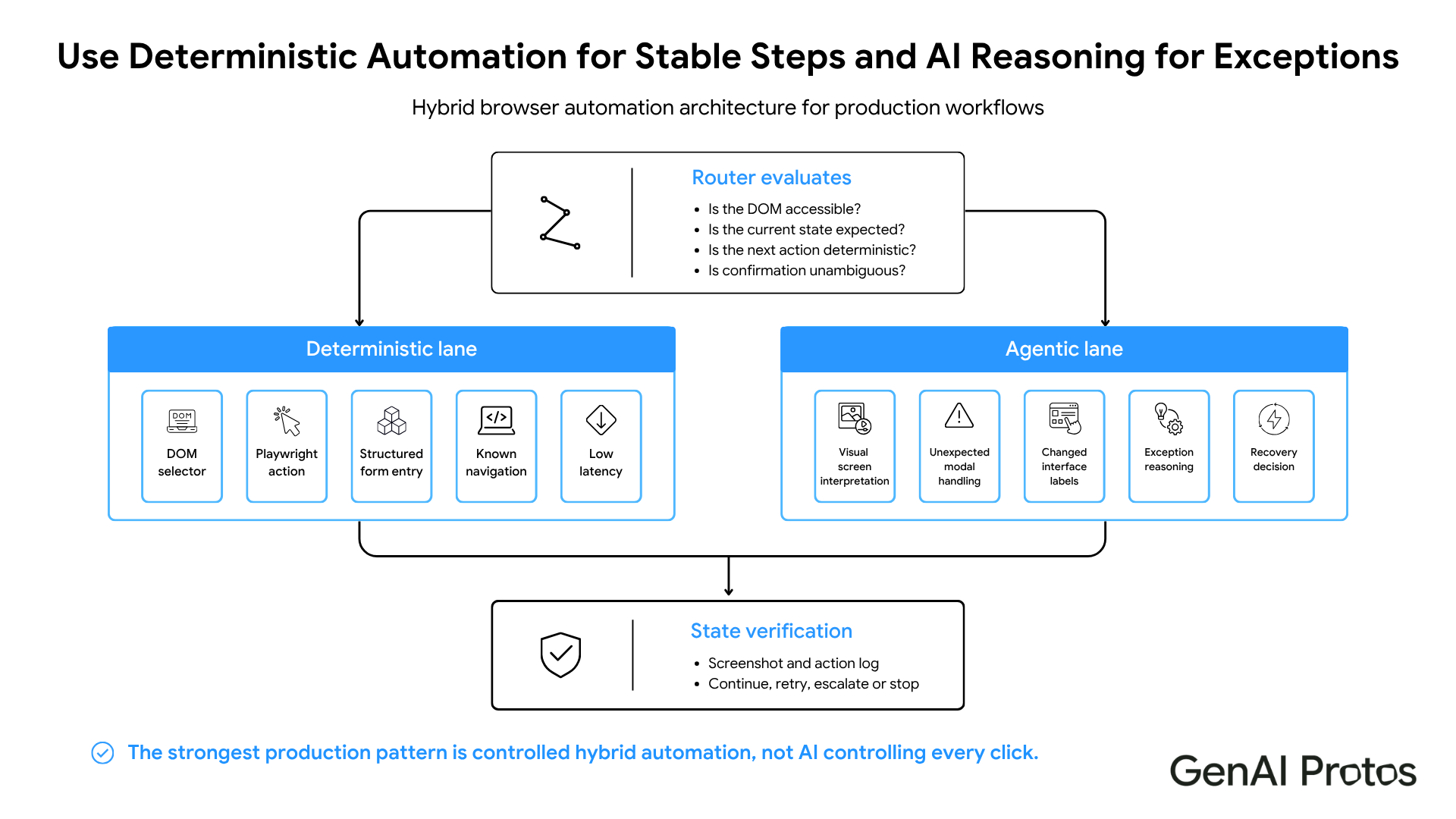
When a browser agent submits a form and the system returns to a blank form rather than showing a success message, the agent cannot determine whether the submission succeeded or the form reset. Many enterprise applications have ambiguous post-submission states. Implement explicit state verification at every critical step.
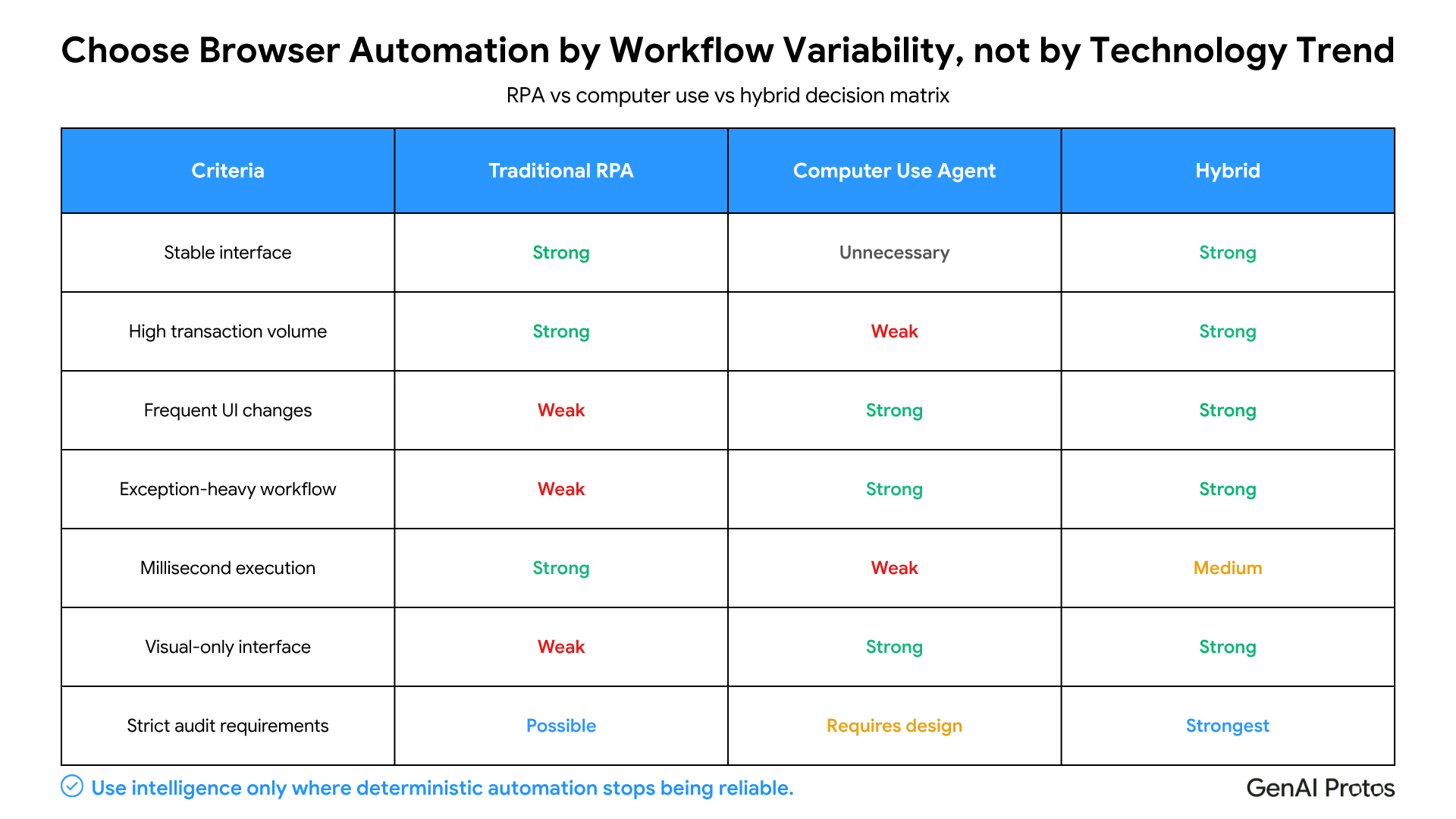
AI RPA vs AI Agents: When to Use Each
Use traditional ai rpa for workflows that run thousands of times per day where latency matters, systems with stable UIs that change infrequently, and tasks where cost per action is a primary constraint.
Use computer use ai agents for workflows on systems that update frequently, exception-heavy processes where rule-based logic would require hundreds of conditional branches, and tasks that require reading and interpreting on-screen content before taking action. This is the intelligent automation sweet spot: ambiguous workflows where hard-coded rules break faster than they can be maintained.
Hybrid architectures work well. AI rpa or Playwright handles structured DOM access and UI navigation, and a language model handles decision-making at exception points. The combined pattern delivers the cost efficiency of ai rpa where the workflow is stable and the resilience of computer use ai agents where it is not. The multi-agent orchestration layer determines which path to take based on the current state of the workflow.
Relevant solution: The AI-Powered Gmail Agent demonstrates bounded automation with classification, drafting and controlled actions.
What Teams Get Wrong With Deployment
Testing only the happy path. Computer use ai agents demos show the ideal sequence. Production includes expired sessions, system errors, network timeouts, and unexpected modal dialogs. Every ai rpa or computer-use deployment needs a test suite that covers the most common exception states. The 2026 AI agent development lifecycle guide covers testing patterns and production readiness criteria that apply directly to browser automation deployments.
No retryand circuit-breaker logic. A browser agent that fails silently creates worse outcomes than one that fails loudly. Implement explicit error handling: retry on transient failures, alert on persistent failures, and stop the workflow rather than proceeding in an uncertain state. This error handling architecture is a core component of the Full-Stack AI Engineering service GenAI Protos delivers for production browser automation deployments.
Skipping action logging. Log action metadata, target system, state transitions, confirmation decisions and outcome by default. Capture screenshots selectively for failures or high-risk transitions, with redaction, access restrictions and a defined retention period.
Security Architecture for Computer-Use Agents
Computer use ai agents
Consume untrusted content from webpages and documents. Malicious instructions embedded in page content can attempt to redirect the agent, expose internal data or trigger unauthorised actions. This is prompt injection at the browser level, and it is a core risk in any browser automation deployment that reads user-generated or third-party content.
A production security architecture for computer use ai agents covers these controls.
Isolation
Run the browser in an isolated virtual machine or container. The agent should not share file-system access, network access, or credentials with the host system beyond what the specific workflow requires.
Allowlists
Define and enforce a domain allow list. The agent should only navigate to approved URLs. Unexpected redirects to external domains should halt the workflow and trigger an alert.
Least-privilege identities
Use service accounts with the minimum permissions the workflow requires. The agent should not run under a full admin identity. Rotate service account credentials on a defined schedule.
File-system and download controls
Restrict the agent's ability to read, write, or download files beyond the working directory the workflow requires.
Egress controls
Network egress from the browser environment should be restricted to approved destinations. Outbound connections to unexpected endpoints are a signal of prompt injection or data exfiltration.
Secret isolation
Credentials, tokens and API keys should not be accessible to the agent directly. Pass them through secure injection mechanisms rather than environment variables readable by the model.
Human approval gates
Any action that submits a form, creates a record, sends a communication or commits a financial transaction should require explicit human approval before execution, unless the workflow has been pre-authorised for autonomous operation within defined parameters.
Step and cost limits
Set a maximum number of steps, retries and estimated cost per workflow run. A runaway agent that loops on an error should stop automatically rather than accumulating unexpected cost or side effects.
Key Takeaways
- Agents using visual screen perception navigate by intent, not fixed selectors. They are more resilient to UI changes than traditional RPA.
- Browser Use, OpenAI CUA, and Playwright-based agents each have distinct trade-offs on authentication, latency, and DOM access.
- Browser automation performs reliably on sequential workflows with explicit confirmation states. Ambiguous confirmation states, shadow DOM, closed shadow roots and session timeouts are common sources of failure - their impact depends on application architecture.
- Use traditional RPA for high-frequency stable workflows. Use AI agents for exception-heavy, frequently changing interfaces.
- Every production browser agent needs explicit error handling, retry logic, and action logging.
- Prompt injection defense, isolation, allow lists and human approval gates are essential security controls for any production computer use ai agents deployment that reads third-party content.
Conclusion
Computer-use agents become useful when autonomy is bounded by verification, permissions, exception handling and human approval. GenAI Protos combines agent reasoning with deterministic controls so browser automation can operate reliably across real enterprise workflows.

