
The MCP protocol standardizes how language models connect to external tools, data sources, and systems. It solves a real problem: before MCP, every AI agent integration required custom glue code for every tool. With MCP, any MCP-compatible client connects to any MCP-compatible server. The problem is that "any client" includes attacker-controlled agents in indirect prompt injection attacks. This post covers how the model context protocol works, what an enterprise MCP server must include, and the tool calling patterns that scale versus the ones that create security exposure.
Specification reviewed: MCP specification as of August 2026. The protocol is under active development; verify current spec details at modelcontextprotocol.io before implementation.
What the Model Context Protocol Actually Is
The model context protocol defines a client-server architecture for AI agent tool access. An MCP server exposes a set of tools, each with a name, description, and input schema. An MCP client, which is the AI agent framework, discovers available tools, sends the tool schema to the language model, and executes tool calls when the model decides to invoke a tool.
The critical insight: MCP is not a complete enterprise security platform. The current specification does define an optional OAuth-based authorisation framework for HTTP deployments, but server operators must still configure identity providers, scopes, tool-level policy enforcement, token validation, rate limits, input validation and audit controls. For teams deciding between MCP, RAG, and direct AI agent integrations, the GenAI Protos MCP vs RAG vs AI Agents comparison clarifies when each pattern applies.
The model context protocol currently defines two standard transports: stdio for local subprocess communication and Streamable HTTP for remote client-server communication. Streamable HTTP replaced the earlier HTTP with Server-Sent Events transport. Custom transports such as WebSocket can be implemented but are not part of the standard transport set. Enterprise deployments use Streamable HTTP for remote servers and stdio for local process integrations.
MCP Server Architecture for Production
A production MCP server has four required components beyond the protocol itself.
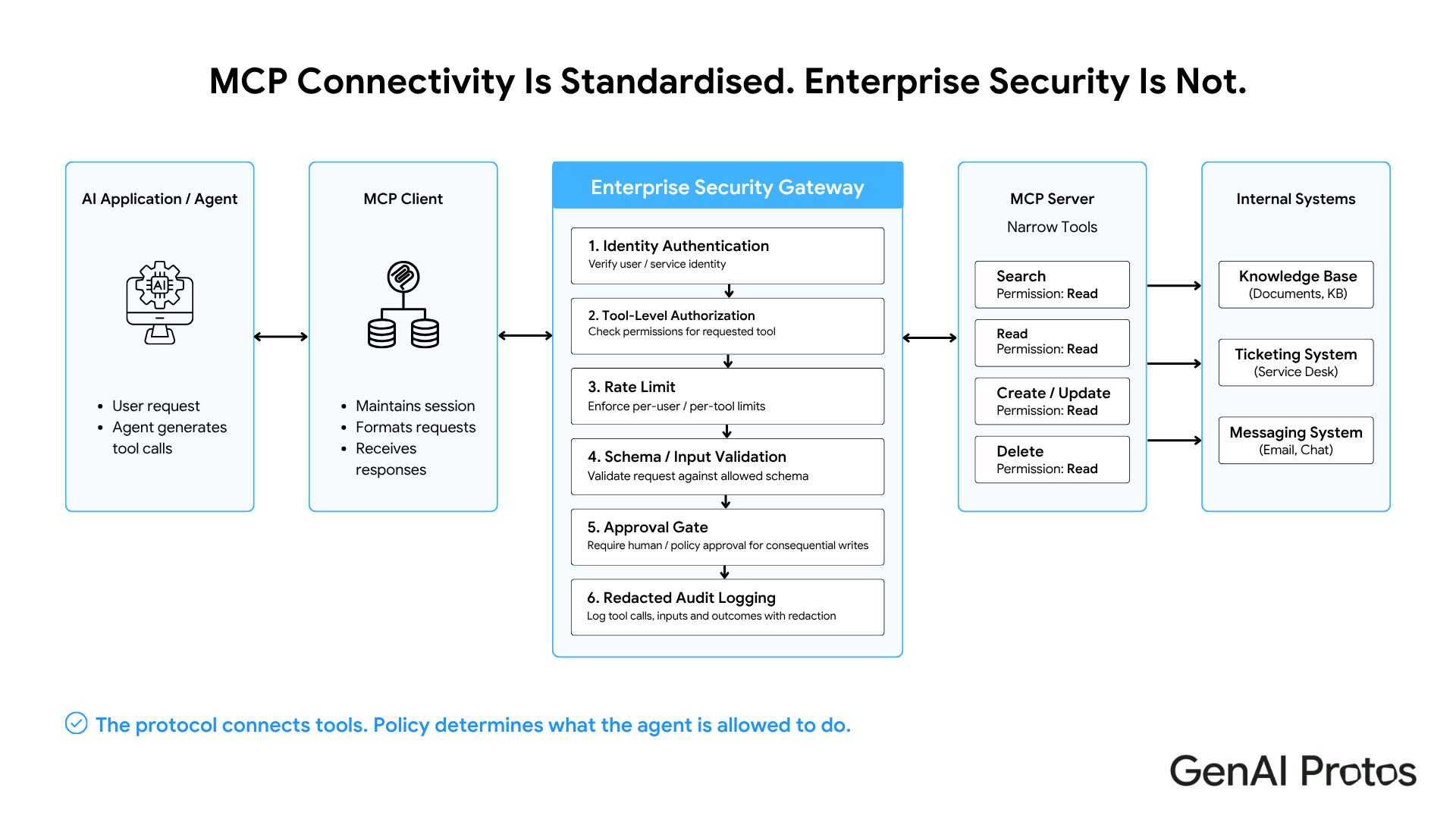
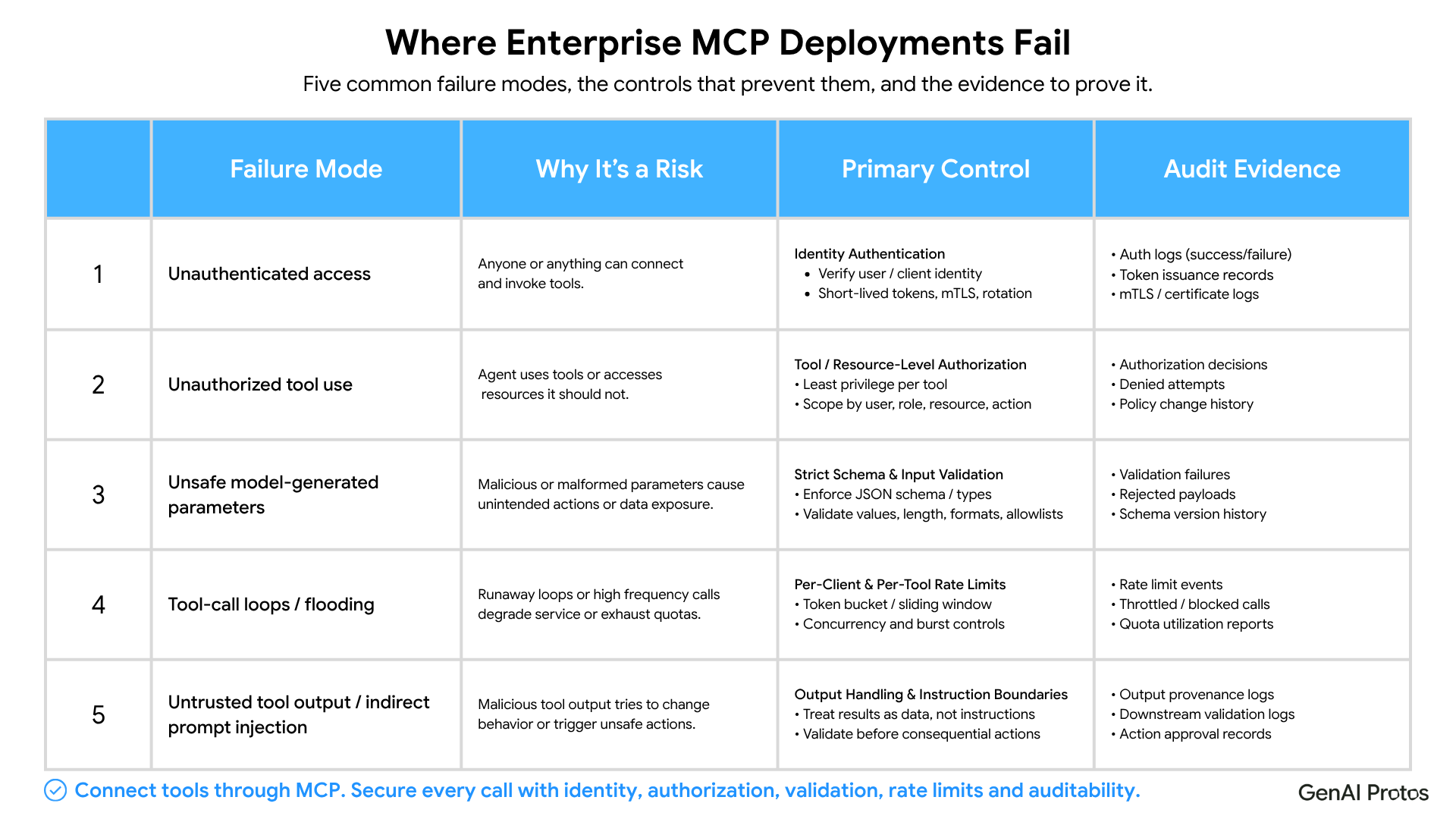
Authentication. Remote MCP servers handling enterprise data should authenticate and authorise every request. Local stdio servers should run with tightly restricted process, file-system and environment permissions and obtain credentials through secure local mechanisms. The authentication mechanism depends on your environment: OAuth 2.1 for delegated user access to SaaS tools such as Confluence and Jira; workload identity or service-to-service OAuth for machine-to-machine connections; mTLS as an additional transport-identity control where appropriate; and static API keys only for constrained legacy integrations, stored and rotated securely. Unauthenticated MCP servers are a data exfiltration risk. An agent that connects to an unauthenticated mcp server can access every tool it exposes with no access control.
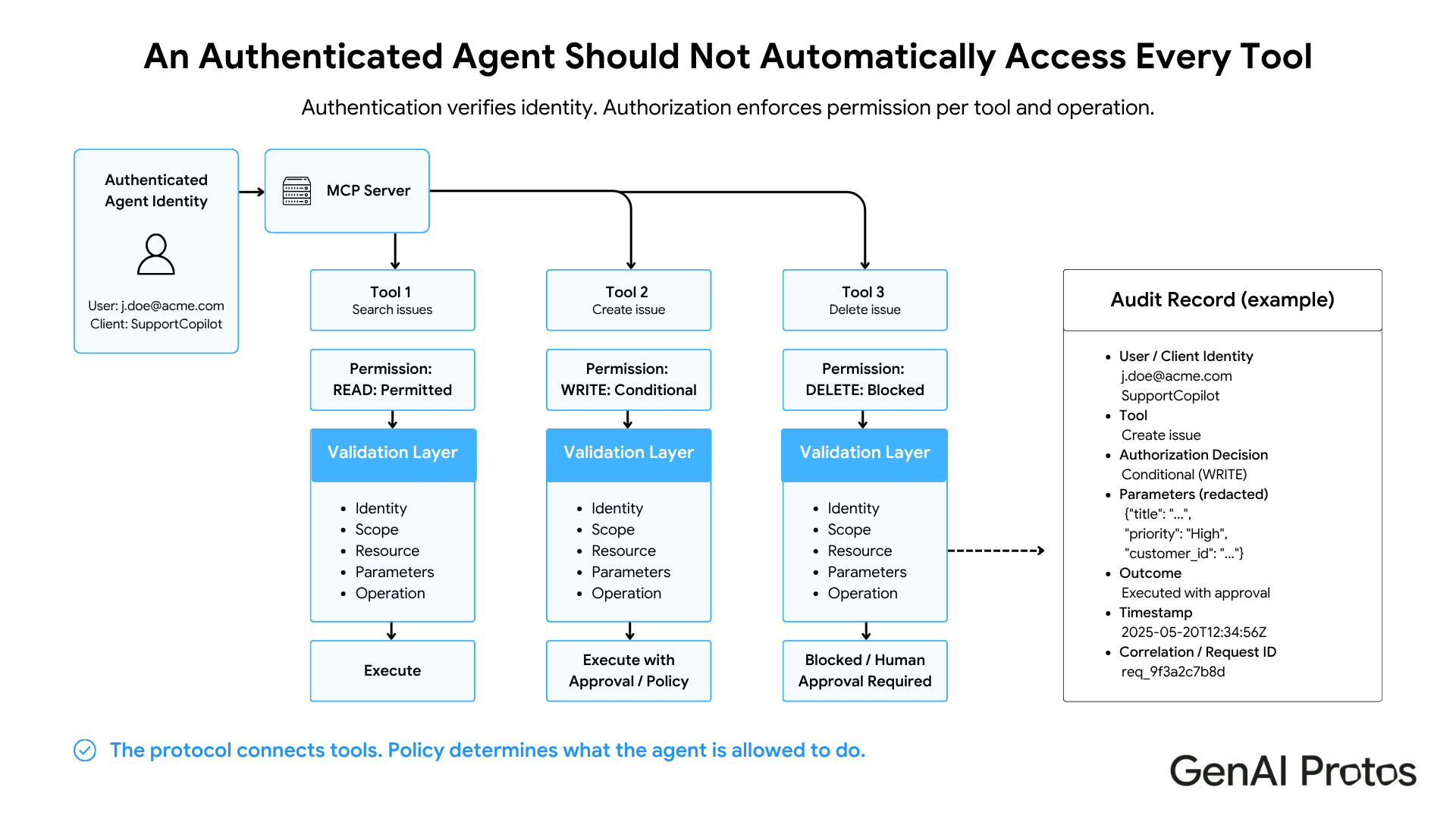
Authorization. Authentication confirms identity. Authorization determines what that identity can access. An authenticated agent that connects to your Jira MCP server should only access the projects that agent's service account is permitted to read. Implement tool-level authorization: the `create_issue` tool requires write permission, the `search_issues` tool requires read permission. Do not give every agent full access to every tool on the server.
Ratelimiting. Language models invoke tools in loops. An agent thatencounters an error may retry a failing tool call hundreds of times in seconds. Without rate limiting, a misbehaving agent can exhaust your API quota, trigger downstream rate limits in the tools you are calling, or generate significant cost. Implement per-client, per-tool rate limits at the MCP server layer.
Input validation. The tool calling interface accepts free-form strings from the language model. The language model can generate any string. Validate all tool inputs before passing them to downstream systems. SQL parameters must be parameterized, not interpolated. File paths must be sanitized. Webhook URLs must be validated against an allow list. Tool inputs from language models are user-controlled content. Treat them accordingly.
Tool results also require careful handling. Treat all tool outputs as untrusted data: separate retrieved content from system instructions, ensure tool results cannot grant new permissions, apply operation and destination allowlists, and require explicit human approval for consequential or irreversible actions.
Explore our agent expertise: GenAI Protos builds Multi-Agent systems that coordinate tools, permissions and specialist agents through governed orchestration.
Tool Calling Patterns That Scale
Pattern 1: Narrow tool schemas
Define the minimum necessary parameters for each tool. A tool that accepts a JSON blob of arbitrary structure is harder to validate, harder for the model to use correctly, and more likely to pass unexpected inputs to downstream systems. Narrow schemas: `search_jira_issues(project_key: str, query: str, max_results: int)` is better than `call_jira(payload: dict)`.
Pattern 2: Toolresult caching
Manyagent tools make repeated read requests to the same resources. A Confluence agenttools call that fetches the same page multiple times in one session wastes API quota. Cache read tool results at the MCP server layer with a short TTL appropriate to the data freshness requirements.
Pattern 3: Tool call logging
Log every tool call with: request and correlation ID, client and user identity, tool name and version, authorisation decision, a redacted parameter summary, outcome and error category, duration, and downstream system. Store complete payloads only where justified by the use case, with encryption, access controls and a defined retention policy. Do not log authorisation tokens, credentials or sensitive field values. This is essential for debugging agent behavior, auditing access for compliance, and detecting prompt injection attempts. The multi-agent orchestration layer GenAI Protos builds includes tool call logging as a mandatory component.
Reference Architectures: Confluence, Jira and Slack
The following are illustrative reference architectures showing how GenAI Protos structures MCP-connected enterprise tool integrations. Implementation details vary by organization.
The Confluence AI Agent exposes search, page read, and page write tools via MCP. The search tool accepts a CQL query and returns page titles, summaries, and URLs. The page write tool requires approval in the orchestration layer before executing. No agent writes to Confluence without a human approval gate in the workflow.
The Jira AI Agent exposes issue search, issue creation, comment addition, and status transition tools. The status transition tool is gated on role: only agents acting on behalf of users with transition permission in Jira can invoke it. The agent tools schema reflects the permission model of the underlying system.
The Slack AI Agent for IT Services handles IT request classification, routing, and response via MCP-connected tools. Message posting requires channel-level authorization: the agent can post to IT support channels and not to executive channels.
Relevant solution: The Confluence AI Agent shows how enterprise knowledge tools can be exposed through controlled search, read and write workflows.
What Teams Get Wrong With MCP Protocol Deployments
Building an MCP server without anauth layer. This is the most common production failure. The server works perfectly in development. In production, any agent with network access can connect. Implement authentication before the first external-facing deployment.
Exposing write tools without approval gates. Agent tools that create, modify, or delete data should require human approval in the orchestration layer for any action that cannot be trivially reversed. Issue creation is reversible. Database deletion is not. Gate accordingly. Teams building multi-agent systems should also review the A2A protocol for how agents communicate with each other beyond MCP tool integrations.
Using the tool description as the security boundary. MCP protocol tool descriptions tell the language model what the tool does. They do not restrict what the tool can do. A tool description that says "search for issues in project X" does not prevent the model from passing "project Y" as the project parameter. Input validation is the security boundary, not the tool description.
Key Takeaways
- The MCP protocol standardizes tool access for AI agents. It provides an optional OAuth-based authorisation framework for HTTP transports, but enterprise teams must still configure identity providers, scopes, tool-level policies, input validation, rate limits and audit controls.
- Every production MCP protocol deployment requires authentication, authorization, rate limiting, and input validation.
- Narrow tool calling schemas are easier for models to use correctly and safer to validate.
- Log every tool call with agent identity, tool name, authorisation decision, a redacted parameter summary, and outcome. Store full payloads only where justified, access-controlled and retention-limited.
- Write-capable agent tools need human approval gates in the orchestration layer for irreversible actions.
Conclusion
MCP standardises tool connectivity, but production value depends on identity, authorisation, validation, observability and approval controls. GenAI Protos designs MCP architectures that preserve interoperability without weakening enterprise security or operational governance.


